



Here you will find many answers to your questions!
Discover the General Features of Dokkup And all its Benefits For You.
What is this application for?
Simplicity and accessibility: you can manage your administrative and personal data from your phone, with an easy-to-use filing system. Each time there's a new document, invoice, ticket, etc., you can scan it directly from your phone and file it in the right place. All your documents are accessible from your phone and are organized according to a pre-defined tree structure. You can complete it as you wish.
Data confidentiality: at a time when data protection concerns are growing, dokkup offers a 100% local storage option, directly on your phone. This choice guarantees total control over your personal data, while integrating mechanisms to mitigate the limitations of local storage (secure backups, simplified transfers, export options, etc.). But if you wish to use your own cloud, you can do that too. Your data, your choices. For now, the cloud option is limited to iCloud and Google Drive.
Social implications: the application also includes features specifically designed to meet the needs of caregivers and families. It allows you to centralize essential information about your loved ones or any other person, including administrative documents, advance directives, and important medical data. These features aim to facilitate organization, coordination, and decision-making in the sometimes complex situations caregivers face daily. Furthermore, you can designate a trusted person to whom you can securely transmit all or part of your own personal information. This option is particularly valuable in case of emergency or unforeseen events, ensuring quick and structured access to the data you consider important.
Do I need to create an account?
Yes, it's necessary because one license grants two activations. This way, with the same email address, the application can be downloaded on 2 different devices. This is important if you have chosen the local storage option on your phone. In this case, the two devices do not communicate with each other, and you can create your backups and reinstall them on your second device. In case of theft, you can use the second device to cut off access to dokkup on the lost or stolen device.
Why have a personal profile? And how is it different from the first world I created?
That's a very good question.
When you create your first world, this also automatically creates your personal profile (bottom right) to save you time.
But then you do what you want. Worlds are there to categorize and view all your documents; you can change the name of the worlds as you wish.
But your personal profile concerns you; it's your personal information. You use it or not, and you put what's important to you there. It's in this space that you can centralize all the important information you want to make easily accessible to your trusted person. It's also in this space that you'll find your personal administrative address book and all the information you want to put there, even your passwords if you wish! Don't forget that your dokkup has a password and its access is automatically locked!
Where is my data stored?
That depends on the option you have chosen.
Local storage:
Files are stored exclusively locally on my phone. Theft is a risk, but it's possible to remotely deactivate the application from the second device. Depending on the file size, exports or backups can be hosted in a cloud for a maximum duration of 7 days to allow you to retrieve and save them on your computer. However, this is a cloud hosted in Switzerland, by a Swiss provider (Infomaniak), which guarantees data confidentiality. Furthermore, files are protected by a password. After the 7-day period, files hosted on the cloud are destroyed.
While local storage can be a limitation, it's the basic principle for ensuring the security of your data. Given the current context, it's clear that local storage capacities will improve over the years. Furthermore, you have your second device to import your backups and have the same information elsewhere.
Cloud storage:
You can also decide that you prefer to use your own cloud, which you consider sufficiently secure. In this version, dokkup can only connect to iCloud and Google Drive. But many new features are expected later!
Local storage or cloud storage? What are the risks?
Zero risk doesn't exist; it differs depending on your choices, and at dokkup, the main thing is to respect your choices. Clouds are generally more structurally secure, and a phone can be more vulnerable, but it all depends on the user. A careful user will properly protect their phone (PIN, encryption, biometrics, etc.) and set a strong password, both for their phone and for their cloud.
Clouds are more often targeted by hackers (mass attacks, large volume of data), whereas a phone hack only concerns one user (opportunistic attack, phishing, physical theft).
If you lose your phone, data can be compromised or lost, which is not the case for the cloud. Thus, dokkup offers two activations with a single license to allow you to install dokkup on another device, keep backups, and remotely deactivate access to dokkup on the stolen phone.
So if you choose local storage, everything has been designed to limit risks in case of theft and ensure the confidentiality of your data on your phone only. It's your choice based on your priorities and personal considerations regarding these security and cloud issues.
In any case, an automatic lock is installed on the app, so that it's not possible to access the app without a password, even if you haven't logged out of the app when leaving it.
In any case, only you can adequately protect your devices. So be sure to secure your phone with appropriate passwords, back up regularly, and take all usual measures to maximize your security when you are in a public place or connected to Wi-Fi. No one else can do it for you.
Can I change my storage choice?
Yes, if you initially chose local storage and ultimately wish to use your cloud.
When you install the application, you decide what type of storage you want: keep files locally or use your cloud (iCloud or Google Drive). This is a choice you make when you create your account.
So if you chose local storage and later change your mind, you can go to the menu at the top right when you are on your profile and switch to cloud storage. The first time, transferring files might take some time, depending on the number of files already available in your dokkup and your connection type. If you have installed dokkup on a second device, then the cloud option will also be automatically installed on your second device, so that both devices can communicate with each other.
Note that while you can switch from local storage to cloud storage, you cannot do the reverse, at least for now.
But anything is possible; new features will be continuously offered!
What is the duration of my subscription and how do I cancel it?
The duration is 12 months, automatically renewable.
At any time, it's possible not to renew the subscription by deactivating it from the application or from the stores, depending on your initial purchase method.
What happens if I cancel my subscription?
You can create a backup of your dokkup at any time and keep it. Your backup is protected by a password and you will still be able to access your documents.
At the end of the activation period, if the subscription is not renewed, you will still have the option to make a backup if you haven't already done so. Some features will remain available in your dokkup, including this one.
You can also delete your account, which will remove all dokkup data from your phone. Please note that this will erase all files, whether stored locally or in your cloud.
If you delete your account without making a backup beforehand, you will no longer have access to any files. It will then be too late. You will still be able to view your backup files, but you will no longer be able to restore them into another dokkup.
Do I need a connection to use the application?
No, if you have chosen the local storage option. You can access your data at any time, since it's on your phone.
But regardless of your storage choice, you can scan and categorize your files at any time.
However, you do need a Wi-Fi connection if you wish to import, export, back up, save or synchronize your files in the cloud, or share a file with someone.
Is dokkup available in other languages?
Yes! The default language is that of your region. But you can easily change it in the "General settings" of the menu accessible from your personal profile.
dokkup is available in French, German, and Italian (since it was created in Switzerland) but also in English and Spanish. Other languages will follow; you can always make a suggestion!
How was the dokkup application created?
This idea stemmed from the need for an application that could manage personal data and that of other people, and to leave directives in case of accident or death. As a solution that would bring together all the important elements for us didn't exist, we decided to create it and make it accessible to everyone, aiming to maintain an affordable price, because we want as many people as possible to benefit from it.
It's a story of will, values, friendship, and sharing that, we hope, will be useful to you in your daily life!
Where can I consult the terms and conditions (T) and the privacy policy?
They are accessible on the app from the "General settings," located in the top right menu when you are in your personal profile.
If any changes are made, you will obviously be informed.
How to perform updates?
When an update is available, you will receive an update notification in the App Store/Play Store or via automatic updates according to your settings.
How to contact dokkup and where are you located?
We are a company based in Lausanne, Switzerland.
You can easily contact us from this site on the "contact" page and send us a message. We look forward to hearing your suggestions for improvement.
All the Tips and Tricks To Use and Customize your Dokkup.
What can I customize?
Everything can be customized: worlds, content, colors, favorites, documents to share with your trusted person—everything!
Where can I find the list of all available folders and subfolders?
A very good question!
dokkup currently offers nearly 25 folders and 210 suggested subfolders.
You can also create 5 additional folders, and for each folder, in addition to all the suggested subfolders, you can freely create 10 subfolders for each folder...
The list of all folders and subfolders is accessible on the site on this same page, next to the tutorials, and is titled "Available Folders".
You can also navigate within your app!
Feel free to share your suggestions for new names!
Can I add files already on my phone?
Yes, of course. The central button allows you to scan new files or import them from your phone.
I scanned a document but I'm in a hurry, what should I do?
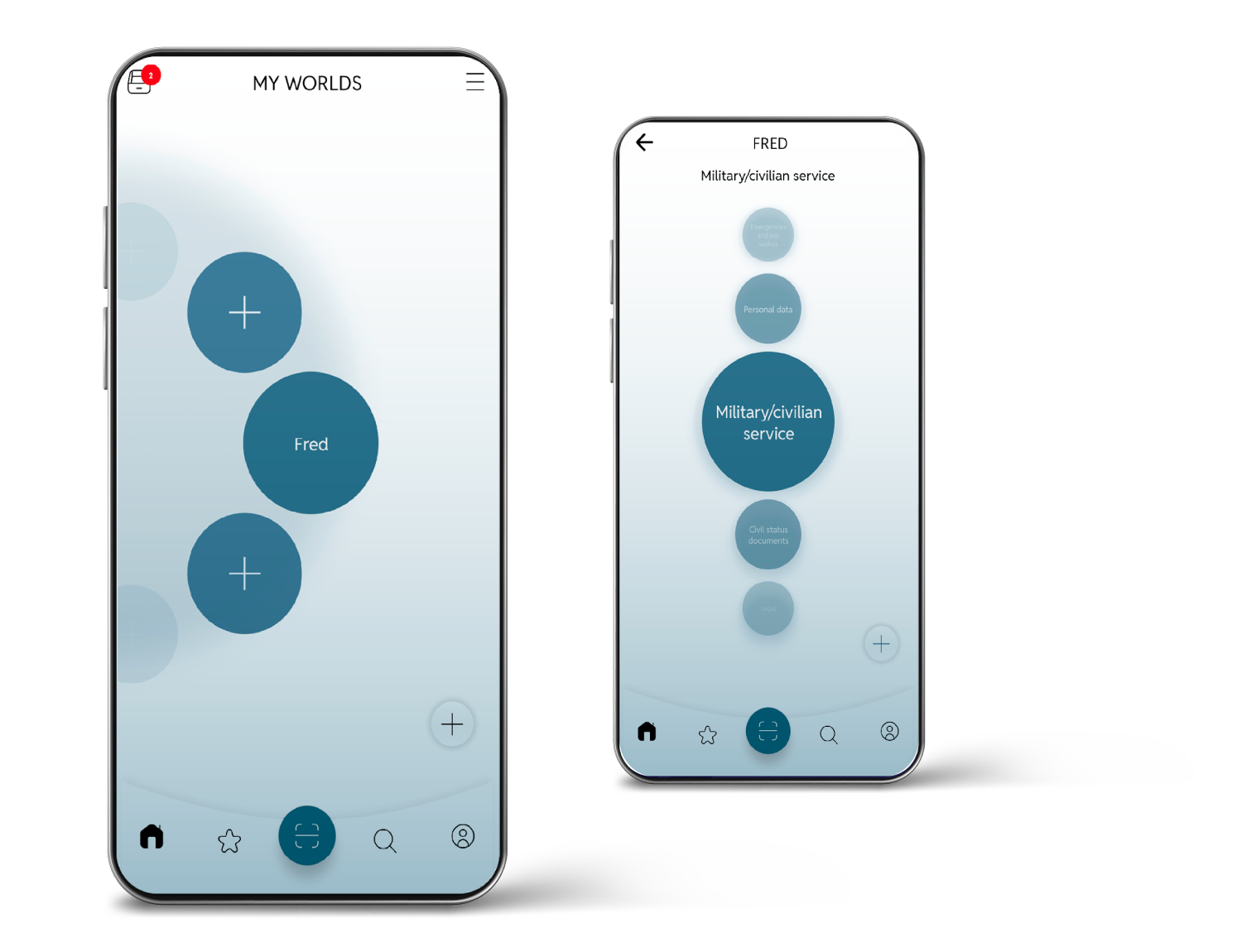
No problem, that's the function of the sandbox. It's temporary storage that allows you to resume working on your file later to name and categorize it as you wish. A small red number appears on the icon of your worlds home screen, to remind you of the files you still need to categorize.
Note that files in the sandbox are not synchronized if you have chosen the cloud option, so don't forget to categorize them when you have time!
How to add a new world?
Very simple: you click on the "+" located in an empty world or at the bottom right when you are on the worlds screen. You can then give it a name, choose the color for this world, and, if you wish, add a photo of the person concerned by the world you have created.
Of course, you can also give your world another function; you decide.
How can I add folders and/or subfolders?
Just as simple: you click on the "+" located in a circle or at the bottom right when you are on the folders or subfolders screen, and you select or deselect the items that interest you for the world you are in. You can even freely create a folder (up to 5) or a subfolder (up to ten subfolders for each folder).
A small clarification and tip: if you categorize a document and realize you hadn't already created the corresponding folder or subfolder, you can do it at that moment. So there's no need to go back, and especially no need to activate all folders or subfolders from the start. Just do it when you need to. dokkup adjusts to your needs at the right time and aims for simplicity and pragmatism!
How to change the name or color of my worlds?
Simply click on the menu at the top right of the screen when you are on the worlds screen. Changes will apply to the world located exactly in the center of your screen. To modify another world, you need to move the world with a circular motion to place the world to be modified in the center of your screen. You can also press and hold the world for 3 seconds, and the "edit" option will open.
How many worlds can I create?
You can create a maximum of 8 worlds. Enough to sort everything you need, for whomever you need it for! If you really need more, let us know why, to give us ideas for improving the application!
My child has grown up and wants to retrieve their information; can I transfer their world to them?
Of course, you just need to click on the menu at the top right of the screen when you are on the worlds screen, and you can export the world that is in the center of your screen. Two options are then possible with the export: you can keep this world or delete it after transmitting it. Your son will be able to perform the same operation to import the world once he has a subscription.
Why another address book?
The application offers an address book focused on administrative contacts, to differentiate them and keep them separate from your usual address book. Perhaps you prefer to keep your administrative contacts elsewhere?
But on this point too, it's up to you to decide if you want to use this feature... or not!
How do imports/exports and backups work?
Very simple, imports/exports or backups generate a ".zip" file containing all elements of a world (if exporting a world - world menu) or all elements of the application (if backing up- personal profile menu).
This file can be sent by email or via a link retrieved from a cloud, depending on the file size (Swiss cloud of our service provider Infomaniak where files are stored for a maximum of 7 days). In any case, you choose a password to protect access to the ".zip" file. Note that if you have forgotten your password, it is accessible from your phone in your backup history.
Then, imports can be performed from another device, which will recreate worlds (if they didn't exist) or complete the files of an existing world.
Be careful, a full backup can only be imported into the dokkup of the user who created it. You cannot import a complete backup from another user into your account! Each user has their own documents. What you can do, however, is share a “world” with another user, but never a full backup.
How do you designate a trusted person?
You need to go to your personal profile screen (icon at the bottom right) and open the menu (top right). Then, select the "Trusted Person" tab. You must choose a trusted person from your address book or create one. Once you have chosen your trusted person, you select which tabs you want to make accessible to them. Finally, you will need to "activate" the trusted person and send them an access code. For more information, you can always check out the tutorials on the website!
How does the trusted person access my information?
The trusted person will have received a code via SMS. If necessary, they can open the dokkup application on your phone, enter their code (only the last code sent to the active trusted person will work), and thus access the information you have chosen to share. You might say that to open the phone, they will also need your code, so what's the use of this feature? Indeed, that's true, you will also have to give them your code, yes, but they won't have to search your entire phone to identify where the important information is, and they will be able to access dokkup, which is protected by another password...
In the future, we have many ideas to address this question, but Rome wasn't built in a day.
What if my local storage is limited?
There are several possibilities. You can keep backups on your computer or elsewhere, you can ensure your photos are on a cloud and only have your dokkup files on your phone (sometimes you need to clear some phone memory), or you can export worlds to another device. Soon you will be able to download the application to your computer, which will definitively solve the issue of storage and file retention. This way, you can keep only the essentials on your phone. Note that you can already do this if your second device is an iPad or an Android tablet. Tablets often have a larger storage capacity than phones.
Or you can switch to cloud storage!
How do I find a document quickly?
It's easy, you have two options. You can use the search function or you can favorite the documents you need most often!
Learn more about the Benefits Your Dokkup License.
One license = 2 activations, what does that mean?
This means that for the price of one subscription you can download the application on two different devices.
If you have chosen the cloud storage option, this is a small bonus for you; your dokkup and all its content will be automatically accessible on two devices and managed from either one depending on your needs.
This is especially important if you have chosen the local storage option, to allow you to keep a copy of your dokkup on another medium, especially in case of theft!
In this case (local storage), your 2 devices will obviously not be able to communicate with each other. You will therefore need to regularly perform exports or backups and then import them into your second device to update documents between your two applications. You can also simply keep a backup file on your computer. It's a constraint, certainly, but a necessity to guarantee data confidentiality, as it concerns personal data, which is the most important information you have! Who better than yourself to guarantee total confidentiality? Be sure to secure your phone with adequate passwords, perform regular backups, and take all usual measures to maximize your security when you are in a public place or connected to Wi-Fi. No one else can do it for you.
Can I make backups?
Yes, at any time, directly from the app.
If you use Local Storage mode, make sure to create regular backups, since your files are stored only on your device.
If you use the Cloud option, no manual backup is required: your documents are automatically synced and stored in your cloud space every 2 minutes whenever you have an active internet connection.
⚠️ Important: before deleting your account, you must create a backup, regardless of your storage mode.
Deleting your account permanently removes all your data and associated files. Without a prior backup, they will be lost permanently.
How can I read and use a backup?
In the dokkup app
Your full backups can be re-imported on another of your devices connected to your dokkup account.
For security reasons, you can only import your own backups. It is not possible to import a full backup created by another user.
When you import a full backup, dokkup will:
recreate your worlds,
restore your folders and subfolders,
reorganize all your files,
and restore all your personal profile information.
If you no longer have a dokkup account or the app
If you have deleted your account but still want to recover your files, this is absolutely possible.
You can open the ZIP backup, extract the files, and access them directly without using dokkup.
⚠️ Important:
Do not forget the password you set when creating the backup.
Without the dokkup app, it is not possible to recover this password.
If you have trouble accessing the files (error message, password not requested, etc.), this may be related to your Windows version.
Simply install a tool such as WinZip or WinRAR and extract the ZIP file using one of these programs.
This approach ensures that you always retain access to your files, even without dokkup, while maintaining a high level of security.
Why my own cloud and not an application-specific cloud?
Dokkup was designed so that you always remain in control of your documents. That’s why the app does not use an internal cloud: your files are only stored on your phone or in your own cloud (iCloud or Google Drive), according to your choice.
Why?
- You remain the sole owner of your data: it is never imported or hosted by dokkup.
- We have no access to it: no reading, analysis, commercial use or hidden storage.
- Your data is protected by Apple or Google’s privacy policies and their encryption systems (data at rest encryption, secure transfer, biometrics, personal credentials).
- Since nothing is stored by dokkup, there is no central database to hack, which eliminates one of the biggest cybersecurity risks.
- If you delete your account, everything is erased: dokkup keeps nothing. It’s up to you to make a backup beforehand, as we will not be able to help you recover your files.
- You stay free: local, cloud, switching from local to cloud, backup, deletion… you decide.
And why a temporary cloud for exports?
When a backup is too heavy, sending a large ZIP file by email can become impossible. To help you, dokkup provides a temporary cloud where your export is stored for 7 days, so that you can retrieve it easily. After this period, it is automatically deleted and can no longer be recovered.
Why Infomaniak?
Because we want a secure, sovereign and transparent environment:
- cloud hosted in Switzerland
- compliant with Swiss data protection laws
- encryption (TLS/SSL and AES)
- no dependence on a foreign tech giant
- no exploitation or analysis of data
https://www.infomaniak.com/en/about
Thus, the temporary cloud allows you to retrieve large backups without size limitations.
Files are encrypted, hosted in Switzerland, then automatically deleted after 7 days.
You are free to use it or not. And it’s your responsibility to retrieve your export within 7 days and perform regular backups.
What if my phone is stolen or I lose it?
If one of your devices has been stolen, go to your second device and deactivate the stolen one to block any access to your dokkup account.
If both devices were stolen, install dokkup on a new device, sign in with your credentials, then deactivate the stolen devices. Dokkup cannot be used on a new device as long as the previous ones remain active. Once deactivated, you’ll be able to use the app normally again.
After the deactivation, dokkup will no longer be accessible on the stolen devices without the account login and password (which are automatically removed from the dokkup home screen). Your files also remain protected by a password on the phone itself, and the device’s native protections (passcode, Face ID/Touch ID, remote lock, etc.) add an additional layer of security against unauthorized access.
To recover your files on a new device:
- Local storage: only your backups will allow you to retrieve your documents. Without a backup, the data is permanently lost. If you have one, simply restore it.
- Cloud storage: you’ll need to wait for your new device to sync with your cloud. The delay depends on your connection speed and the volume of your files.
This procedure allows you to remotely cut off access to stolen devices.
If you want to erase all your files (local + cloud), you must delete your account.
⚠️ Note: after account deletion, even if you have a backup, you won’t be able to import it into dokkup again, because only the original account owner can restore a backup.
This rule is designed to maximize your security: even if you create a new account with the same email, you won’t be able to re-import your data. You’ll have to rebuild your dokkup manually the first time.
.
What should I do if I want to delete EVERYTHING and delete my account?
You can delete your account directly from the app, in the general settings, under “Delete my account”. You will be asked to confirm your choice before your account is permanently erased.
What does this mean?
Deleting your account has several important consequences:
- All your files and data will be permanently deleted, whether you use local storage or synchronized cloud storage (iCloud / Google Drive).
- This action is irreversible: once the account is deleted, no recovery is possible.
- If you use local storage, make sure to create a backup before deleting your account, otherwise all your data will be lost.
- If you use cloud storage, your files will also be deleted from the cloud linked to your dokkup account, so be sure to make a backup beforehand.
- And remember: since your documents are never stored by us but only in your own storage spaces, failing to back up before deleting your account means you will lose absolutely everything.
Even if you create a new account with the same email address, you won’t be able to automatically reimport your backup. For security reasons, dokkup cannot confirm that it’s still you, so the restoration must be done manually.
What about my subscription?
⚠️ Deleting your account does not cancel your subscription.
To stop billing, you must cancel your subscription from your App Store or Play Store account.
If you do not cancel it, automatic renewal will continue to be applied by Apple or Google.
⚠️ Cloud Sync – Current behavior
In the current version of dokkup using cloud storage:
Only files stored inside worlds are synchronized.
These files are stored in the user’s personal cloud (iCloud or Google Drive) and are automatically synchronized between the two devices linked to the account, approximately every 2 minutes, depending on network and cloud availability.Personal profile data is not synchronized in real time at this stage.
This is a deliberate choice to ensure maximum security. We are working on a solution that will allow synchronization entirely within the user’s own cloud, with no data stored on or passing through dokkup servers, in line with our principle:
“Everything stays with you, nothing with us.”Full backups can be created at any time.
A full backup includes both files and personal profile data.
The backup can be:stored locally (for example on a computer), or
manually imported on a second device to fully restore the personal profile and related data.
This approach ensures secure file synchronization while giving users maximum control over their personal data.
Why must the “dokkup” folder in my cloud not be modified?
When you use cloud storage, the application automatically creates a folder named “dokkup” in your cloud.
This folder is essential for the proper functioning of the application.
⚠️ Important
The “dokkup” folder must never be:
opened manually,
modified,
renamed,
moved,
or used to add or delete files.
Why?
This folder is used by the application for:
backing up your documents,
synchronizing data between your devices,
ensuring the security and integrity of your data.
Any manual modification may lead to:
synchronization errors,
data loss,
or application malfunctions.
What should I do instead?
👉 All documents must be added, accessed, and managed exclusively through the dokkup application.
Learn all about
dokkup in a few tutorials
Create your own world
Add a document
Change language
Create your profile
Activate the trusted person
Do you want a complete overview of what
dokkup has in store for you?
To simplify your life, dokkup offers you many ready-to-use folders and subfolders. To give you an idea of all the possibilities, we have organized them into three groups: personal, administrative, and leisure.
You just have to make your choice according to your needs!
Personal
Personal
data
Emergencies and
Last wishes
Civil Status
Health
Education
Work
Civil/
Military Service
Pets
![]() |
Passport | ![]() |
National identity card |
![]() |
Residence Card | ![]() |
OASI Card |
![]() |
Health Insurance Card (NINO) | ![]() |
Driving License |
![]() |
Vehicle Registration | ![]() |
Parking Badge |
![]() |
Disability Card | ![]() |
Senior Card |
![]() |
Student Card | ![]() |
Travel Passes |
![]() |
Rescue/Repatriation Card | ![]() |
Waste Card |
![]() |
Press Pass | ![]() |
Custom Subfolder |
![]() |
Blood Type Card | ![]() |
Will |
![]() |
Last wWshes | ![]() |
Madante for Incapacity |
![]() |
Organ Donation Card | ![]() |
Custom Subfolder |
| Civil Status Certificates | ![]() |
Nuptial agreements | |
![]() |
Family record book | ![]() |
Voter Card |
![]() |
Certificate of Life | ![]() |
Death Certificate |
![]() |
Attestations of Residence abroad | ![]() |
Certificate of Inheritance |
![]() |
Certificate of Civil Capacity | ![]() |
Consent Forms |
![]() |
Travel Authorization for Minors | ![]() |
Custom Subfolder |
![]() |
Health Insurance | ![]() |
Top-up Insurance Plans |
![]() |
Accident Insurance | ![]() |
Certificate of Health |
![]() |
Certificate of Vaccination | ![]() |
Medical Prescriptions |
![]() |
Medical Appointments | ![]() |
Medical Invoices (Hospital/Clinic) |
![]() |
Medical Invoices (Doctor, Therapist, Lab) | ![]() |
Invoices for Medication, Glasses, Other |
![]() |
Health Insurance Statements | ![]() |
Medical Certificates |
![]() |
Medical Examinations | ![]() |
Custom Subfolder |
![]() |
Training Registration | ![]() |
Timetable |
![]() |
Certifying Diplomas | ![]() |
Certificates Attestations |
![]() |
Training Invoices |
![]() |
Resume (CV) | ![]() |
Employment Contracts and Amendments |
![]() |
Self-Employment | ![]() |
Specifications |
![]() |
Confidentiality Agreements/NDAs | ![]() |
Company Regulations |
![]() |
Annual Salary Statements | ![]() |
Salary Certificates |
![]() |
Work Certificates | ![]() |
Reference Letters |
![]() |
Expense Accounts | ![]() |
Accident Reports |
![]() |
Daily Allowance Statements | ![]() |
Pension Fund Certificates |
![]() |
Resignation Letters | ![]() |
Custom Subfolder |
![]() | Military Card | ![]() | Military Service Record |
| Civil Service | ![]() | Civil Law Contract | |
![]() | Custom Subfolder |
![]() |
Pet Passport | ![]() |
Pet ID Card |
![]() |
Vaccination Record | ![]() |
Pet Insurance |
![]() |
Purchase/Sale | ![]() |
Ownership Permit |
![]() |
Veterinarian | ![]() |
Medications |
![]() |
Quarantines | ![]() |
Custom Subfolder |
Administrative
Finances
Social
security
Private
Insurance
Taxes
Real Estate
Rentals
Real Estate
Properties
Legal
Permits
![]() |
Bank Accounts | ![]() |
Credit Agreements |
![]() |
Account Statements | ![]() |
Annual Certificates |
![]() |
Check Stubs | ![]() |
Stocks/Options |
![]() |
General Terms and Conditions | ![]() |
Custom Subfolder |
![]() |
Unemployment Insurance / Social and Financial Assistance | ![]() |
Welfare, Social and Financial Assistance |
![]() |
Housing Assistance | ![]() |
Scholarship |
![]() |
Disability Insurance | ![]() |
Pension or Private Pension Schemes |
![]() |
Financial Aid for Families | ![]() |
Subsidies |
![]() |
Supplementary Income | ![]() |
Other Asssitance |
![]() |
Custom Subfolder |
![]() |
Life Insurance | ![]() |
Personal Liability Insurance |
![]() |
Household or Buildings Insurance | ![]() |
Fire Insurance |
![]() |
Motor Liability Insurance / Breakdown Cover | ![]() |
Roadsite Assistance |
![]() |
Legal Protection Insurance | ![]() |
Vehicle Leasing Contracts |
![]() |
Travel Insurance | ![]() |
Funeral/Death Insurance |
![]() |
Other Insurance | ![]() |
Insurance Cancellation Letters |
![]() |
Refund Statements | ![]() |
Custom Subfolder |
![]() |
Personal Income Tax Rates (declaration, decision, ...) | ![]() |
Taxes for Corporate Income(declaration, decision, ...) |
![]() |
Invoices for Tax Deduction (individual) | ![]() |
Invoices for Tax Deduction (corporate) |
![]() |
Tax Certificates | ![]() |
Correspondence with Tax Authority |
![]() |
Custom Subfolder |
![]() |
Lease Contracts and Rent Gurarantees | ![]() |
Property Inspections |
![]() |
Furniture Inventories | ![]() |
Rent Receipts |
![]() |
Correspondence with Owner/Property Management | ![]() |
Contracts (household, alarm, ...) |
![]() |
Housing-Related Bills | ![]() |
Chimney Sweeping Certificates |
![]() |
Custom Subfolder |
![]() |
Notarial Deeds | ![]() |
Land Registry, Cadastre |
![]() |
Building Permit | ![]() |
Architectural Project/Other Expertise |
![]() |
Proof of Tax Payments | ![]() |
Invoices Renovations for Tax Deductions |
![]() |
Utility Contracts (electricity, gas, water, ...) | ![]() |
Maintenance Contracts |
![]() |
Housing-Related Bills | ![]() |
Chimney Sweeping Certificates |
![]() |
Annual Boiler Maintenance Certificates | ![]() |
Property Management |
![]() |
Proof of Payment Condominium Charges | ![]() |
Minutes Condominium General Meeting |
![]() |
Lease/Rental Contracts | Property Inspections | |
![]() |
Furniture Inventories | ![]() |
Correspondence with Tenant |
![]() |
Custom Subfolder |
![]() |
Judgment Decisions | ![]() |
Administrative Decisions |
![]() |
Proceedings (debts and/or bankruptcy) | ![]() |
Debt Enforcement Register Extracts |
![]() |
Certificate of Lack of Assets | ![]() |
Extract from the Register of Criminal Records |
![]() |
Accounts Receivable | ![]() |
Power of Attorney (POA) |
![]() |
Guardianship, Curatorship | ![]() |
Court Orders |
![]() |
Custom Subfolder |
![]() |
Events | ![]() |
Hunting |
![]() |
Fishing | ![]() |
Weapon |
![]() |
Custom Subfolder |
Leisure
Travel
Cooking
Licenses
and subscriptions
Shopping
My Loyalty
Cards
Other important
files
Custom
folder
![]() |
Tickets | ![]() |
Boarding Passes |
![]() |
Vehicle Reservations | ![]() |
Accommodation Bookings |
![]() |
Schedules/Timetables | ![]() |
Vaccinations |
![]() |
Visas/Authorizations | ![]() |
Correspondence |
![]() |
Useful Information | ![]() |
Custom Subfolder |
![]() | Starters/Appetizers | ![]() | Meats |
![]() | Fish | ![]() | Vegetables |
![]() | Pasta and Rice | ![]() | Sauces |
![]() | Fruits | ![]() | Desserts |
![]() | Cookies | ![]() | Cocktails |
![]() | Hot Drinks | ![]() | Smoothies |
![]() | Vegetarian | ![]() | Vegan |
![]() | Gluten-Free | Lactose-Free | |
![]() | My Recipes | ![]() | Coocking Tools |
![]() | Custom subfolder |
![]() |
Mobile phone | ![]() |
Internet Service |
![]() |
Sports club | ![]() |
Fitness and gyms |
![]() |
Leisure Activities | ![]() |
IT |
![]() |
Custom subfolder |
![]() |
Invoices | ![]() |
Receipts/Certificates of Guarantee |
![]() |
Discount vouchers | ![]() |
Deliveries |
![]() |
Correspondence | ![]() |
User manuals |
![]() |
Custom subfolder |
![]() |
Custom subfolder |
![]() |
Custom subfolder |
![]() |
Custom subfolder |
In your favorite store,
dokkup is waiting for you!
iOS
App Store
Billed annually - cancellable anytime
- Available in French, English, Spanish, Italian, and German.
- License for your mobile and a second device for backups
- Updates included in the subscription
- No ads
- No transmission of your information
Android
Play Store
Billed annually - cancellable anytime
- Available in French, English, Spanish, Italian, and German.
- License for your mobile and a second device for backups
- Updates included in the subscription
- No ads
- No transmission of your information


